type
Post
status
Published
date
Feb 8, 2023
slug
summary
不知道有没有更好的简谱软件
tags
lilypond
python
简谱
音乐
category
探索新世界
icon
password
sibelius苦简谱久矣
我最常用的就是sibelius这个打谱软件,但是这个软件是不能生成简谱的。
我找了半天,发现网上确实是有这个插件,但是真的有点贵...
后来接了一个打简谱的活,我上蹿下跳在mac和win的平台上找遍了,都没有找到合适的软件。
我一气之下淘宝找了个人帮我手打的,还花了我100元,真的是痛彻心扉!
Jianpu in Lilypond
这个项目是我偶然看到的
大概的流程就是
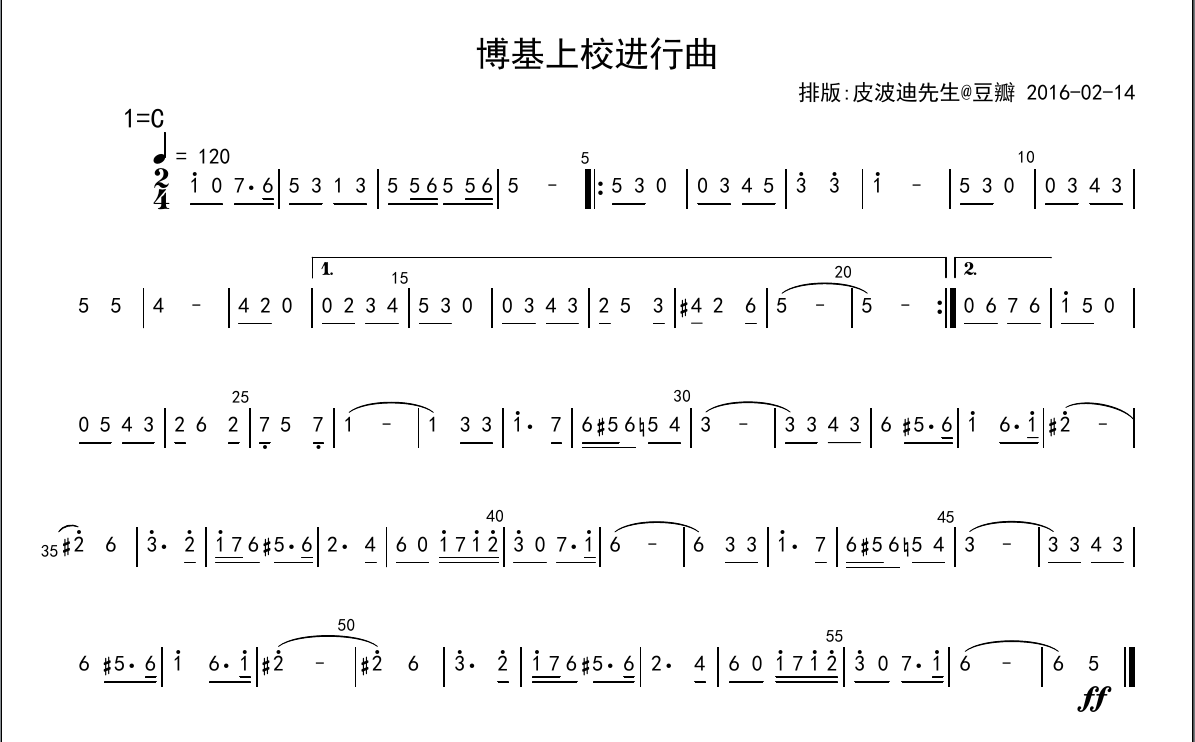
- 按格式书写一个
jianpu.txt文件。
- 下载jianpu-ly.py这个脚本文件。下载地址
- 在命令行下输入
python3 jianpu-ly.py < jianpu.txt > jianpu.ly
- 根据上一步生成的ly文件,生成出pdf文件。
txt格式的文件
关于所有格式的信息都在这个网站的这个表格里,写的非常详细。
我按照别人的例子稍作修改,如下:
title=博基上校进行曲
arranger=xhhdd
1=C
2/4
1 2 3 2 1 q2 q3 3 2
L: here are the syl- la- bles
生成ly文件
生成的ly文件非常的复杂:
\version "2.18.0"
#(set-global-staff-size 20)

% un-comment the next line to remove Lilypond tagline:
% \header { tagline="" }

\pointAndClickOff

\paper {
  print-all-headers = ##t %% allow per-score headers

  % un-comment the next line for A5:
  % #(set-default-paper-size "a5" )

  % un-comment the next line for no page numbers:
  % print-page-number = ##f

  % un-comment the next 3 lines for a binding edge:
  % two-sided = ##t
  % inner-margin = 20\mm
  % outer-margin = 10\mm

  % un-comment the next line for a more space-saving header layout:
  % scoreTitleMarkup = \markup { \center-column { \fill-line { \magnify #1.5 { \bold { \fromproperty #'header:dedication } } \magnify #1.5 { \bold { \fromproperty #'header:title } } \fromproperty #'header:composer } \fill-line { \fromproperty #'header:instrument \fromproperty #'header:subtitle \smaller{\fromproperty #'header:subsubtitle } } } }
  % As jianpu-ly was run on a Mac, we include a Mac fonts workaround.
  % The Mac version of Lilypond 2.18 used Arial Unicode MS as a
  % fallback even in the Serif font, but 2.20 drops this in Serif
  % (using it only in Sans), which means any Serif text (titles,
  % lyrics etc) that includes Chinese will likely fall back to
  % Japanese fonts which don't support all Simplified hanzi.
  % This brings back 2.18's behaviour on 2.20+:
  #(define fonts
    (set-global-fonts
     #:roman "Times New Roman,Arial Unicode MS"
     #:factor (/ staff-height pt 20)
    ))

  % Might need to enforce a minimum spacing between systems, especially if lyrics are below the last staff in a system and numbers are on the top of the next
  system-system-spacing = #'((basic-distance . 7) (padding . 5) (stretchability . 1e7))
  score-markup-spacing = #'((basic-distance . 9) (padding . 5) (stretchability . 1e7))
  score-system-spacing = #'((basic-distance . 9) (padding . 5) (stretchability . 1e7))
  markup-system-spacing = #'((basic-distance . 2) (padding . 2) (stretchability . 0))
}

\score {
<< \override Score.BarNumber #'break-visibility = #center-visible
\override Score.BarNumber #'Y-offset = -1
\set Score.barNumberVisibility = #(every-nth-bar-number-visible 5)

%% === BEGIN JIANPU STAFF ===
    \new RhythmicStaff \with {
    \consists "Accidental_engraver"
    %% Get rid of the stave but not the barlines:
    \override StaffSymbol #'line-count = #0 %% tested in 2.15.40, 2.16.2, 2.18.0, 2.18.2, 2.20.0 and 2.22.2
    \override BarLine #'bar-extent = #'(-2 . 2) %% LilyPond 2.18: please make barlines as high as the time signature even though we're on a RhythmicStaff (2.16 and 2.15 don't need this although its presence doesn't hurt; Issue 3685 seems to indicate they'll fix it post-2.18)
    }
    { \new Voice="jianpu" {

    \override Beam #'transparent = ##f % (needed for LilyPond 2.18 or the above switch will also hide beams)
    \override Stem #'direction = #DOWN
    \override Tie #'staff-position = #2.5
    \tupletUp

    \override Stem #'length-fraction = #0
    \override Beam #'beam-thickness = #0.1
    \override Beam #'length-fraction = #0.5
    \override Voice.Rest #'style = #'neomensural % this size tends to line up better (we'll override the appearance anyway)
    \override Accidental #'font-size = #-4
    \override TupletBracket #'bracket-visibility = ##t
\set Voice.chordChanges = ##t %% 2.19 bug workaround

    \override Staff.TimeSignature #'style = #'numbered
    \override Staff.Stem #'transparent = ##t
     \mark \markup{1=C} \time 2/4 #(define (note-one grob grob-origin context)
  (if (and (eq? (ly:context-property context 'chordChanges) #t)
      (or (grob::has-interface grob 'note-head-interface)
        (grob::has-interface grob 'rest-interface)))
    (begin
      (ly:grob-set-property! grob 'stencil
        (grob-interpret-markup grob
          (make-lower-markup 0.5 (make-bold-markup "1")))))))
  \applyOutput #'Voice #note-one c'4
#(define (note-two grob grob-origin context)
  (if (and (eq? (ly:context-property context 'chordChanges) #t)
      (or (grob::has-interface grob 'note-head-interface)
        (grob::has-interface grob 'rest-interface)))
    (begin
      (ly:grob-set-property! grob 'stencil
        (grob-interpret-markup grob
          (make-lower-markup 0.5 (make-bold-markup "2")))))))
  \applyOutput #'Voice #note-two d'4
#(define (note-three grob grob-origin context)
  (if (and (eq? (ly:context-property context 'chordChanges) #t)
      (or (grob::has-interface grob 'note-head-interface)
        (grob::has-interface grob 'rest-interface)))
    (begin
      (ly:grob-set-property! grob 'stencil
        (grob-interpret-markup grob
          (make-lower-markup 0.5 (make-bold-markup "3")))))))
| %{ bar 2: %}
  \applyOutput #'Voice #note-three e'4
  \applyOutput #'Voice #note-two d'4 | %{ bar 3: %}
  \applyOutput #'Voice #note-one c'4
\set stemLeftBeamCount = #0
\set stemRightBeamCount = #1
  \applyOutput #'Voice #note-two d'8[
\set stemLeftBeamCount = #1
\set stemRightBeamCount = #1
  \applyOutput #'Voice #note-three e'8]
| %{ bar 4: %}
  \applyOutput #'Voice #note-three e'4
  \applyOutput #'Voice #note-two d'4 \bar "|." } }
% === END JIANPU STAFF ===

\new Lyrics = "IX" { \lyricsto "jianpu" { here are the syl --
la --
bles } }
>>
\header{
title="博基上校进行曲"
arranger="xhhdd"
}
\layout{} }
\score {
\unfoldRepeats
<<

% === BEGIN MIDI STAFF ===
    \new Staff { \new Voice="midi" { \transpose c c { \key c \major  \time 2/4 c'4 d'4 | %{ bar 2: %} e'4 d'4 | %{ bar 3: %} c'4 d'8 e'8 | %{ bar 4: %} e'4 d'4 } } }
% === END MIDI STAFF ===

>>
\header{
title="博基上校进行曲"
arranger="xhhdd"
}
\midi { \context { \Score tempoWholesPerMinute = #(ly:make-moment 84 4)}} }
不太清楚前面定义了什么,不过最终渲染出来确实是简谱。

前面的调跟拍号的距离有一点点紧凑,不知道能不能调整。
最后
这篇文章也是拖了很久才写。
我记得还是前几年的时候,那时候用的windows系统,不知道是用了个什么软件,反正生成简谱非常的简单。
可视化、没有广告,自定义程度比较高。
后来前几年再找的时候已经完全不见了,可能我也忘记了软件名字。
可能那天也非常背,电脑开着双系统,又卡又急,等着交活。装了一堆软件都用不了。
最后再去年发现了这个脚本。
现在想想,如果长期有简谱需求的话,还是去买一下sibelius的插件,现在来看也不是很贵。
不过现在接的活应该很少有简谱的了。
这个转简谱的脚本做一个备用吧,打一打简单的谱子可以临时用用。
- 作者:xhhdd
- 链接:https://blog.xhhdd.cc/article/906730d8-ae33-450a-a749-5ecc483625ab
- 声明:本文采用 CC BY-NC-SA 4.0 许可协议,转载请注明出处。
相关文章